
Apple hasn’t realeased anything official for those who weren’t there, but these videos are OK. If you don’t want to watch the whole thing, FreshDV has excellent condensed coverage. And there are worthwhile write-ups from Larry Jordan (who was one of the few who saw this six weeks ago at Apple), Scott Simmons, and Walter Biscardi. UPDATE: And a first-the-bad-news impression by Mike Jones.
Two Free Color Correction Plug-ins from Red Giant Software
Today Red Giant Software released two new Magic Bullet effects for Final Cut, Premiere, and After Effects, and they are 100% free for any kind of use.
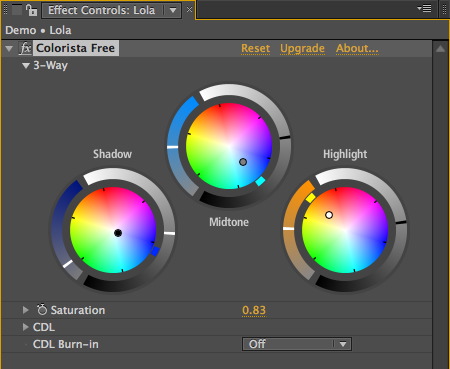
First up is Colorista Free. Part of the goal of the original Colorista was to create a single, easy-to-use 3-way color corrector that would be consistent across multiple platforms. When we updated it to Colorista II, the goal expanded to packing as much color correction power as could possibly fit into one effect. Colorista II has been extremely popular, which warms my heart, because it means filmmakers everywhere are putting real care into their color correction work.
But I never lost sight of that original goal of creating a color corrector that everyone could use. I pointed out to the team that Rebel CC continues to be a popular download from Prolost. We joked internally that Colorista II was so powerful, we should just give the original Colorista away for free.
And then I stopped laughing.
Colorista Free isn’t exactly the original Colorista. It lacks a few features, most notably Power Masks. But by stripping it down to something simple, we enabled a feature that even Colorista II can’t boast: CDL compatibility.
CDL stands for Color Decision List. Like an EDL, but for color corrections, the CDL is a method of sharing simple, primary grades between different systems. It was created by the American Society of Cinematographers and is supported by nearly all high-end color grading systems.
Twirl open the CDL section of Colorista Free and you’ll see nine sliders called Slope, Offset, and Power. These, along with the Saturation control, are the ten values that the CDL uses to communicate a grade. You can edit them directly if you like, but you don’t have to—they are a mirror of the color wheels. If you have CDL values from another system, you can enter them manually, or create a scripted workflow that transfers values to and from these sliders.
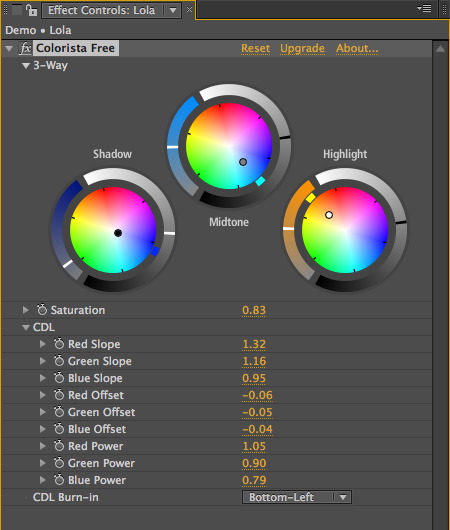
The CDL is an emerging standard and the workflows surrounding it are not set in stone, so we’re releasing Colorista Free as “workflow ready,” in part to help encourage people to use the CDL, and maybe even share the scripts and tools they use to build a workflow around Colorista Free and other CDL-compliant tools.
If you want an easy way to ensure that CDL values stay attached to your shots, Colorista Free allows you to burn them in to the image. In this way you could do a rough color pass on an edit and send it along to an online color session. The colorist can use the values burned-in to the image as a starting point for their grading, even if they don’t have an automated CDL pipeline.
Or you can just ignore all that stuff and add a free color corrector to your arsenal, confident that you can share your projects with others without requiring them to buy any plug-ins.
Magic Bullet Colorista Free works with Adobe After Effects CS3, CS4 and CS5, Adobe Premiere Pro CS5 and Final Cut Pro 6 and 7.
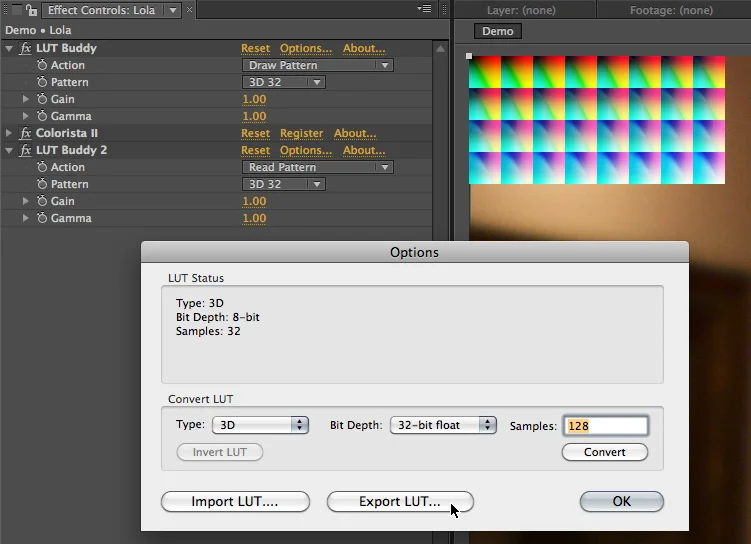
LUT Buddy is also about sharing color corrections, but in a completely different way. Look Up Tables, or LUTs for short, are compact files capable of holding complex color adjustments. People use LUTs to share color grades, simulate display devices and film stocks, and correct gamma and color space issues. The problem is, they’re hard to make. LUT Buddy solves that handily by drawing an unfolded color cube on your image. You can then color correct it however you like. A second application of LUT Buddy reads the corrected colors from the cube and stores the adjustment as a LUT. You can then save that LUT in a variety of formats, or load it back in to LUT Buddy to apply the color correction. With LUT Buddy, a ten-layer-deep color correction can be compacted into one, tiny file that can be loaded into almost any high-end system, and even used for real-time previews on set.
Magic Bullet LUT Buddy works with Adobe After Effects CS3, CS4 and CS5, Adobe Premiere Pro CS5, Final Cut Pro 6 and 7, and Motion 3 and 4.
Lenswhacking on the set of my 2006 PG&E commercial
Movies at High Frame Rates
People have been asking for me for my thoughts on Jim Cameron’s recent presentation at CinemaCon stating that “the future of cinema” is higher frame rates. I haven’t felt the need, really, since I’ve been mouthing off here about how much I love good, old-fashioned 24p for years. I’ve even gone to pains to try to explain why I like it, and why I think others do. Maybe the best example of this is the interview I did with MacVideo last year, but I’ll link to more at the end.
Now it’s been announced that Peter Jackson’s 3D production of The Hobbit will be shot at 48 fps. Maybe it’s time to say something.
I find the notion odd that “the future of cinema” is the recent past of video. Whether it’s 60 fps or 48 (which is close to PAL video’s 50 fields per second), we’ve seen these frame rates before. And audiences have rejected them to varying degrees for as long as I can remember, dating back to my childhood, when my mother would skip over perfectly good BBC dramas because they “looked like soap operas.” No one cared about Showscan, and no one wanted to watch a movie shot on video until 24p came along (unless it had been converted to 24p using something like Filmlook or Magic Bullet). That anyone thinks a movie shot at 60 fps is going to look any different than a well-lit reality TV show is confounding to me.
Still, if James Cameron and Peter Jackson, whose films are hugely influential to me, want to experiment with higher frame rates, I’m happy for them to have the freedom to do so. In the same way that I don’t want my TV set changing the frame rate of the movies I love, I would never dream of telling a filmmaker that they shouldn’t try something about which they are creatively excited.
There’s a big difference between Jim Cameron, who is a filmmaker, choosing a frame rate that he feels is appropriate for his movies, and anyone telling anyone else what frame rate they should shoot. Roger Ebert, I love ya man, but your job is reacting to movies, not dictating their technical specifications.
Still, speaking only for myself, I’m disappointed. When I was growing up and learning filmmaking, Jim Cameron could always be relied on to use technology to push filmmaking forward. Now, I fear that he’s using filmmaking to push technology forward.
Lest the glibness of that remark drown out my meaning, let me explain. Cameron has left a trail of technology improvements in the wake of his films. People couldn’t talk to each other underwater until he made The Abyss. On his budget-conscious Terminator, he drafted the plans for the metal exoskeleton himself. He used his fluency with tech to make his movies better.
But now it’s the other way around, His highly-developed abilities as a writer/director are fooling people into thinking that his technology initiatives are important for all of cinema. Avatar is a great movie. So enjoyable that it left some people thinking, “performance capture is the future!” Or “3D is the future!”
The truth is, Avatar is good because the filmmaking is good. To draw any conclusions about production technologies in general from its success would be akin to suggesting that “Super 16 is the future!” after The Hurt Locker won best picture, or that the tremendous box office of Toy Story 3 means that all films should be animated.
I have no doubt that Avatar 2 will be a good movie. Jim Cameron doesn’t know how to make anything else. What I’m concerned about is that people will attribute their enjoyment of it to 3D and high frame rates, rather than Cameron’s unparalleled skills as a filmmaker.
And then I’ll find myself sitting in some executive’s office trying to explain why I don’t want to shoot their movie at 60 frames per second 3D, instead of just explaining why I don’t want to shoot it in 3D.
See also:
Slumdog Millionaire, Feb 23 2009
Less is More, March 18 2006
Canon Adds 24p to the 5D Mark II and I Blame You, March 1 2010
MacVideo Interview, the part about 24p, Feb 22 2010
Seven Fetishists and Why They Should Relax, July 8 2010

FXPHD April Term, NAB 2011
FXPHD have announced their April term, which includes a course called Epic On Location, where Mike Seymour and I learn you up some Epic. FXPHD courses are always amazing. I have a friend who mastered an entire RED One feature on a single Mac Pro using the guidance of past RED courses. In this case, Mike literally got on a plane from LA, where he had just picked up his Epic, and flew straight back to the other side of the planet to start using the camera to shoot for the class. I landed in New Zealand a few days later and within an hour of stepping off the plane, I was hanging upside-down from cables with a camera. We had a blast shooting some amazing footage, from cars, ziplines, and helicpoters, on rigs designed for much larger cameras and rigs designed for lightweight DSLRs.
I can’t recommend FXPHD enough, but in this case, this course truly is the only game in town when it comes to learning about this revolutionary new camera.
I will be at NAB for one day only (I’m slowly learning how not to go), Tuesday, April 12th, joining Mike on stage at the Post Pit (Booth SL12205) to talk more about the camera. Come by and say hi and then push right past me when you realize that the Epic is also there. I’ll understand.
I will also mention a few cool new things from Red Giant Software. Stuff you’ll like.
HD Magazine has an article about our New Zealand shoot, featuring some photos of and by me. More photos can be found at my Flickr site.
Rebel's Guide on your iPad or Kindle, DV Rebel Tools For Free
My book, The DV Rebel’s Guide, is finally available as an eBook for Apple iOS devices, Amazon kindle, and anything that reads the epub format (such as the Nook). This has been a long time coming, and I wanted to celebrate by giving away updated versions of the DV Rebel Tools scripts that I included with the original edition of the book.

These scripts create a tool palette that turns Adobe After Effects into a full-featured onlining tool. Add color correction effects to clips easily (including Colorista II if you have it installed), and check your grading continuity with a powerful thumbnail view that updates live as you work. For a full tutorial, watch the video:
To install the scripts, download this .zip file and expand it. You’ll see two folders: “Put contents in Presets” and “Put contents in ScriptUI Panels”.
Make sure After Effects is not running. Copy the contents of “Put contents in Presets” into this directory:
/Applications/Adobe After Effects CS5/Presets/
Copy the contents of “Put contents in ScriptUI Panels” into this directory:
/Applications/Adobe After Effects CS5/Scripts/ScriptUI Panels/
Now you can launch After Effects CS5 and find “rd_DVRebelTools.jsx” at the bottom of the Window menu. You can dock the palette into your workspace wherever you like.
Although I created the nerdy expressions and presets that power the DV Rebel Tools, there is a limit to my nerd powers, and that’s where Jeff Almasol stepped in and created the amazing scripts that automate the tools. A big and continued thanks to him. Check out his other handy scripts at redefinery.com.
Update 2011-03-30
After some Twitter responses I figured this is a good place for a quick FAQ:
Q: A lot has changed since the release of The DV Rebel’s Guide. Ever thought of doing a update?
A: No. I’m gonna make movies instead. Besides, the best parts of the book still apply even with a new generation of camera tech.
But don’t despair, because I can’t seem to shut up either. If I were to do an update, it probably wouldn’t be a dead tree product. It would be somehow electronic, and mobile, and able to hold file and video links, and be a part of a conversation, and constantly updated.
Waitaminute… in the famous words of Madge, you’re soaking in it.
So let me change my answer. Yes.