
Sponsor

The Apps


Noir. Cinematic black-and-white and lighting control for your iPhone and iPad.

Plastic Bullet. An infinite variety of vintage camera looks. Now available for Mac.


Cinematic looks for your iPhone and iPad movies.

Needables
  • Canon EOS 5D Mark III 22.3 MP Full Frame CMOS Digital SLR Camera (Body)
    Canon EOS 5D Mark III 22.3 MP Full Frame CMOS Digital SLR Camera (Body)
    Canon
  • The DV Rebel's Guide: An All-Digital Approach to Making Killer Action Movies on the Cheap (Peachpit)
    The DV Rebel's Guide: An All-Digital Approach to Making Killer Action Movies on the Cheap (Peachpit)
    by Stu Maschwitz
  • Canon EOS Rebel T3i 18 MP CMOS Digital SLR Camera and DIGIC 4 Imaging (Body Only)
    Canon EOS Rebel T3i 18 MP CMOS Digital SLR Camera and DIGIC 4 Imaging (Body Only)
    Canon
  • Zoom H4n Handy Portable Digital Recorder
    Zoom H4n Handy Portable Digital Recorder
    Zoom
Wednesday
Apr132005

crop it like it's hot

For some reason I've created a new Fusion Macro. It's a tool to help match color levels across elements in a composite, and it goes by the catchy name of cropCompare.


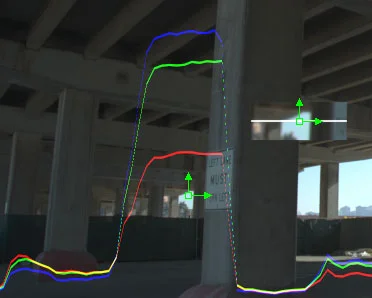
cropCompare lets you define two zoomed-in windows on your image to enlarge, visually compare alongside one another, and even graph the values of. It's designed to assist in matching the black levels of two disparate elements in a comp, but it can be used for all kinds of image analyses.

Add the cropCompare node downstream of your comp and view it. You'll see four position controls and two little windows in the lower right of the image.

You have separate Show controls for Crops 1 and 2. For each Crop, you define its location and Sample Size and choose where on the image to overlay it and how big. Put them next to each other and maybe bump up the Gamma the Crops control to make sure your values are matching.

Or, to really make sure, turn on Do Graphs. You now have an RGB graph of the centerline of each Crop. Want to see those graphs unobstructed? Check Do Graphs and Only together.

For the graphs to look their best, please enable Fusion's HiQ mode.

Please give it a try and let us know what you think!

Download O-cropCompare_v2.2 (8kb .rar file)

Reader Comments (3)

Hey Stu,

Thank you SO MUCH for making this tool available to the public. I've been looking for something like this since I first read Steve Wright's book a couple of years ago.

Much appreciated, I'll be using this all the time in my comps.

Joe

April 13, 2005 | Unregistered CommenterAnonymous

Stu,

Thanks for the macro! You're my new hero ;)

This tool works well in conjuction with a dissolve node to compare/match shots.

Eric

April 14, 2005 | Unregistered CommenterEricD

Hello Stu!

I'd love to use this macro on Fusion5! Is there anyway for you to post an updated version of this great macro? This would be fantastic!

Fleduc

February 12, 2008 | Unregistered Commenterfleduc
Member Account Required
You must have a free and harmless member account in order to post comments. Log in to your account to enable posting. I don't use your information for anything, I just want you to be who you are.
« cropCompare v2.4 | Main | Preorder, like, only the best book on compositing ever »