Prolost Store

The easiest way to support Prolost is to begin your Amazon, iTunes, Mac App StoreZacuto or B&H shopping here. You can drag those links to your bookmarks bar so you never forget. It costs you nothing and it really helps. Thanks!

Prolost & Found (search)
Subscribe


Want to know what it’s like to almost never get email? Subscribe to the Prolost mailing list!

Sponsor

The Apps

Slugline. Simple, elegant screenwriting.

Noir. Cinematic black-and-white and lighting control for your iPhone and iPad.

Plastic Bullet. An infinite variety of vintage camera looks. Now available for Mac.

Needables
  • Canon EOS 5D Mark III 22.3 MP Full Frame CMOS Digital SLR Camera (Body)
    Canon EOS 5D Mark III 22.3 MP Full Frame CMOS Digital SLR Camera (Body)
    Canon
  • The DV Rebel's Guide: An All-Digital Approach to Making Killer Action Movies on the Cheap (Peachpit)
    The DV Rebel's Guide: An All-Digital Approach to Making Killer Action Movies on the Cheap (Peachpit)
    by Stu Maschwitz
  • TASCAM DR-100mkII 2-Channel Portable Digital Recorder
    TASCAM DR-100mkII 2-Channel Portable Digital Recorder
    TASCAM
Tuesday
Nov272012

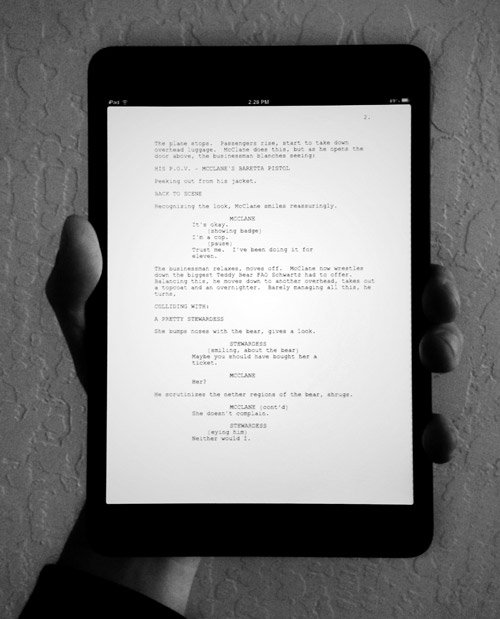
Reading Screenplays on the iPad mini

John August responds to the question of whether the iPad mini is good for reading screenplays:

It is. It’s really good.

I agree completely. Even without a retina display, the mini is a thoroughly pleasant device for reading. And dictating script notes via Siri feels enough like living in the future that I barely miss my flying car.

John’s feelings about the inexpensive but unpretty GoodReader app match mine, and my recommendation hasn’t changed since I wrote about reading screenplays on the iPad Maxi: Spend a few extra bucks and get PDF Expert. It syncs with Dropbox, exports annotations as text files, and won’t hurt your eyes. My only complaint is an old one: with no ability to offset page numbering (to account for page 1 of the PDF corresponding to the unnumbered title page of a screenplay), your exported annotations will be off by one page.

Small price to pay for a hundred screenplays in your pocket.

Reader Comments (5)

For PDF you should give a try on iAnnotate.
I my experience it's not the most pretty PDF reader but its really fast and complete.

I hate that pre-rendereding out of focus image or the grey square that you get while navigating on the PDF Expert. iAnnotate it's way better...

November 30, 2012 | Registered CommenterFernando Azambuja

I've got into the full sized iPad for screenwriting, using Final Draft Writer - the keyboard in landscape is perfect for my fingers.

How is the mini for working on screenplays? Is it comparable to its larger sibling for typing when in landscape? I imagine the keyboard is a bit squashed so potentially not quite as comfortable for longer periods.

I'm more than happy with my iPad 2 but considering the even greater portability of the mini, I'm curious.

December 12, 2012 | Registered CommenterMel Rodriguez

I imagine you'll want to stick with the big guy for writing.

December 13, 2012 | Registered CommenterStu

Man. That PDF Expert icon is ugly though.

January 8, 2013 | Registered CommenterSeth Worley

So true. Makes it much harder sell that the actual UI of the app is preferable to GoodReader largely for its looks.

January 8, 2013 | Registered CommenterStu
Member Account Required
You must have a free and harmless member account in order to post comments. Log in to your account to enable posting. I don't use your information for anything, I just want you to be who you are.
« Watch Me Light Up the Room | Main | Fountain for Sublime Text »