• Blog
  • About
  • Tutorials
  • Prolost Store
  • Archive
    • Recent
    • Featured
    • All
  • Where to Begin?
  • Maschwikipedia
  • Contact
  • Comment Policy
  • Menu

Prolost

by Stu Maschwitz
  • Blog
  • About
  • Tutorials
  • Prolost Store
  • Archive
    • Recent
    • Featured
    • All
  • Where to Begin?
  • Maschwikipedia
  • Contact
  • Comment Policy
No results found

Lenswhacking on the set of my 2006 PG&E commercial

Movies at High Frame Rates

April 04, 2011

People have been asking for me for my thoughts on Jim Cameron’s recent presentation at CinemaCon stating that “the future of cinema” is higher frame rates. I haven’t felt the need, really, since I’ve been mouthing off here about how much I love good, old-fashioned 24p for years. I’ve even gone to pains to try to explain why I like it, and why I think others do. Maybe the best example of this is the interview I did with MacVideo last year, but I’ll link to more at the end.

Now it’s been announced that Peter Jackson’s 3D production of The Hobbit will be shot at 48 fps. Maybe it’s time to say something.

I find the notion odd that “the future of cinema” is the recent past of video. Whether it’s 60 fps or 48 (which is close to PAL video’s 50 fields per second), we’ve seen these frame rates before. And audiences have rejected them to varying degrees for as long as I can remember, dating back to my childhood, when my mother would skip over perfectly good BBC dramas because they “looked like soap operas.” No one cared about Showscan, and no one wanted to watch a movie shot on video until 24p came along (unless it had been converted to 24p using something like Filmlook or Magic Bullet). That anyone thinks a movie shot at 60 fps is going to look any different than a well-lit reality TV show is confounding to me.

Still, if James Cameron and Peter Jackson, whose films are hugely influential to me, want to experiment with higher frame rates, I’m happy for them to have the freedom to do so. In the same way that I don’t want my TV set changing the frame rate of the movies I love, I would never dream of telling a filmmaker that they shouldn’t try something about which they are creatively excited.

There’s a big difference between Jim Cameron, who is a filmmaker, choosing a frame rate that he feels is appropriate for his movies, and anyone telling anyone else what frame rate they should shoot. Roger Ebert, I love ya man, but your job is reacting to movies, not dictating their technical specifications.

Still, speaking only for myself, I’m disappointed. When I was growing up and learning filmmaking, Jim Cameron could always be relied on to use technology to push filmmaking forward. Now, I fear that he’s using filmmaking to push technology forward.

Lest the glibness of that remark drown out my meaning, let me explain. Cameron has left a trail of technology improvements in the wake of his films. People couldn’t talk to each other underwater until he made The Abyss. On his budget-conscious Terminator, he drafted the plans for the metal exoskeleton himself. He used his fluency with tech to make his movies better.

But now it’s the other way around, His highly-developed abilities as a writer/director are fooling people into thinking that his technology initiatives are important for all of cinema. Avatar is a great movie. So enjoyable that it left some people thinking, “performance capture is the future!” Or “3D is the future!”

The truth is, Avatar is good because the filmmaking is good. To draw any conclusions about production technologies in general from its success would be akin to suggesting that “Super 16 is the future!” after The Hurt Locker won best picture, or that the tremendous box office of Toy Story 3 means that all films should be animated.

I have no doubt that Avatar 2 will be a good movie. Jim Cameron doesn’t know how to make anything else. What I’m concerned about is that people will attribute their enjoyment of it to 3D and high frame rates, rather than Cameron’s unparalleled skills as a filmmaker.

And then I’ll find myself sitting in some executive’s office trying to explain why I don’t want to shoot their movie at 60 frames per second 3D, instead of just explaining why I don’t want to shoot it in 3D.

See also:

Slumdog Millionaire, Feb 23 2009 
Less is More, March 18 2006
Canon Adds 24p to the 5D Mark II and I Blame You, March 1 2010
MacVideo Interview, the part about 24p, Feb 22 2010
Seven Fetishists and Why They Should Relax, July 8 2010

Tags: Filmmaking, HFR
37 Comments

FXPHD April Term, NAB 2011

April 01, 2011

FXPHD have announced their April term, which includes a course called Epic On Location, where Mike Seymour and I learn you up some Epic. FXPHD courses are always amazing. I have a friend who mastered an entire RED One feature on a single Mac Pro using the guidance of past RED courses. In this case, Mike literally got on a plane from LA, where he had just picked up his Epic, and flew straight back to the other side of the planet to start using the camera to shoot for the class. I landed in New Zealand a few days later and within an hour of stepping off the plane, I was hanging upside-down from cables with a camera. We had a blast shooting some amazing footage, from cars, ziplines, and helicpoters, on rigs designed for much larger cameras and rigs designed for lightweight DSLRs.

I can’t recommend FXPHD enough, but in this case, this course truly is the only game in town when it comes to learning about this revolutionary new camera.

I will be at NAB for one day only (I’m slowly learning how not to go), Tuesday, April 12th, joining Mike on stage at the Post Pit (Booth SL12205) to talk more about the camera. Come by and say hi and then push right past me when you realize that the Epic is also there. I’ll understand.

I will also mention a few cool new things from Red Giant Software. Stuff you’ll like.

HD Magazine has an article about our New Zealand shoot, featuring some photos of and by me. More photos can be found at my Flickr site.

Tags: Cameras, Color, Magic Bullet, RED
7 Comments

Rebel's Guide on your iPad or Kindle, DV Rebel Tools For Free

March 30, 2011

My book, The DV Rebel’s Guide, is finally available as an eBook for Apple iOS devices, Amazon kindle, and anything that reads the epub format (such as the Nook). This has been a long time coming, and I wanted to celebrate by giving away updated versions of the DV Rebel Tools scripts that I included with the original edition of the book.

These scripts create a tool palette that turns Adobe After Effects into a full-featured onlining tool. Add color correction effects to clips easily (including Colorista II if you have it installed), and check your grading continuity with a powerful thumbnail view that updates live as you work. For a full tutorial, watch the video:

To install the scripts, download this .zip file and expand it. You’ll see two folders: “Put contents in Presets” and “Put contents in ScriptUI Panels”.

Make sure After Effects is not running. Copy the contents of “Put contents in Presets” into this directory:

/Applications/Adobe After Effects CS5/Presets/

Copy the contents of “Put contents in ScriptUI Panels” into this directory:

/Applications/Adobe After Effects CS5/Scripts/ScriptUI Panels/

Now you can launch After Effects CS5 and find “rd_DVRebelTools.jsx” at the bottom of the Window menu. You can dock the palette into your workspace wherever you like.

Although I created the nerdy expressions and presets that power the DV Rebel Tools, there is a limit to my nerd powers, and that’s where Jeff Almasol stepped in and created the amazing scripts that automate the tools. A big and continued thanks to him. Check out his other handy scripts at redefinery.com.

Update 2011-03-30

After some Twitter responses I figured this is a good place for a quick FAQ:

Q: A lot has changed since the release of The DV Rebel’s Guide. Ever thought of doing a update?

A: No. I’m gonna make movies instead. Besides, the best parts of the book still apply even with a new generation of camera tech.

But don’t despair, because I can’t seem to shut up either. If I were to do an update, it probably wouldn’t be a dead tree product. It would be somehow electronic, and mobile, and able to hold file and video links, and be a part of a conversation, and constantly updated.

Waitaminute… in the famous words of Madge, you’re soaking in it.

So let me change my answer. Yes.

Tags: Color, DV Rebel's Guide, Filmmaking, Magic Bullet
28 Comments

Your New TV Ruins Movies

March 28, 2011

If you bought a television recently, or are considering buying one, take heed: your beautiful new flat-panel TV will try very, very hard to make whatever movies you watch on it look not just bad, but aggressively, satanically, puppy-drowningly bad.

It Starts With the Color

TVs are designed to do one thing above all: sell. To do so, they must fight for attention on brightly-lit showroom floors. Manufacturers accomplish this in much the same way that Times Square does — by cranking everything up to eleven. You want brightness? We’ll scald your retinas. You want sharpness? We’ll draw a black outline around everything for you. Like bright colors? We’ll find them even in Casablanca. Oh, and since you associate “yellowing” with age and decay, we’ll also make the image as blue as a retiree’s bouffant on Miami beach.

Here’s how Inception is supposed to look:

Here’s how Inception looks at your local big-box TV store:

It’s understandable how this comes to be. After looking at the TV store version, the correct version looks positively sad. This is why we don’t taste Pino Noir after drinking a Doctor Pepper, and why you can’t compare TVs in a store. At Best Buy or Costco, you’re not comparing TVs, you’re comparing settings. It’s not just that TVs in stores are too bright, too colorful, and too blue—they are clawing over one another to display the brightest, bluest, and most saturated image on a wall of 300 competitors.

At home, you don’t have 300 other TVs to compare yours against, so you won’t suffer from your natural inclination to gravitate toward the most candy-coated images. At home, you’ll be delighted with Inception looking exactly as intended. But, chances are, you won’t be seeing that, because the default settings are wrong.

Fortunately, you probably won’t be seeing the hyper-colorful showroom version either. Most reputable manufacturers want Energy Star approval on their flatscreens, and part of that certification means that the sets cannot come off the truck in “demo mode,” also known as “torch mode.” You may be presented with a choice when you first power up the set: demo mode or something like “home” mode. Pick “home” mode and your default settings will be somewhat tamer than the “hey, look at me” showroom floor configuration.

And that, right there, is as far as 95% of TV owners will ever go toward “calibrating” their TVs. More than ever, this is a tragedy.

How to Fix Your TV’s Color

Most TVs have some preset modes deigned for different uses. There’s often a “Cinema” or “Movie” picture mode. Use it. It’s the best, easiest shortcut to setting up your new TV to be as inoffensive as possible. These modes will be quite subdued compared to the amped-up default settings, so chances are, when you first switch them on, you’ll experience a bit of that “wow, that sure is yellow” sensation that you get when you look back to the correct Inception frame after staring at the torch-mode one for a minute. Don’t worry, this will pass almost immediately.

Even with this done however, your TV is, in all likelihood, still actively trying to destroy cinema, right in your home. Chances are your new TV is an LCD panel, and chances are it features “120Hz!” or even “240Hz!!!”

Motion Smoothing, Emotion Ruining

First, let’s talk about LCD technology versus plasma. Most TVs these days are LCD. Some manufacturers have completely phased out plasma. Why? Because while plasmas look better than LCDs in your home, they don’t win the brighter-bluer battle on the showroom floor.

Pause for a moment to reflect on this tragedy—this battle of who can make the most egregiously wrong image has actually caused a superior technology to fall out of favor with manufacturers. Plasmas lost by making movies look they way they’re supposed to.

How exactly is plasma superior? For the time being anyway, plasma TVs can render much darker black levels than even the best LCDs. This is the single most important factor affecting image quality in the home, where you are likely to watch movies with at least some of the lights off. It’s also something you just plain cannot judge in a brightly-lit store.

It’s worth stating again: If you are TV shopping, just about the worst thing you can do is go look at TVs in a store.

Plasma sets also tend to have superior viewing angles. This means that they look good from a broader array of seating positions. LCDs tend to have a “sweet spot”—they can look fine for whomever is seated right in front of them, but the image quality degrades rapidly as you move off-axis—and that’s both side-to-side and up-and-down.

But my personal favorite thing about plasma TVs is that they usually don’t have a feature common in LCD sets: motion smoothing.

This “feature,” which goes by different names, is associated with sets that tout “120Hz” or “240Hz.” Those are refresh rates, and LCD sets need to tout fast refresh rates, because in the early days of LCDs, they suffered from poor, smeary motion rendering. Those days are gone, and a modern LCD is perfectly capable of displaying 60 clean images per second, which is perfect for NTSC video.

Now I’m going to do that internet-unfriendly thing I try to do every so often, which is make a nuanced point. A 120Hz or 240Hz refresh rate is not inherently a bad thing. In fact, they can be good. Both are multiples of 24, where 60 is not. A 60Hz TV, such as a CRT, must display 24p material using an alternating cadence known as 3:2 pulldown. Every other frame is shown for slightly longer or shorter than the previous (2/60ths of a second, then 3/60ths, then 2, then 3, and so on). We don’t tend to notice this, but it is hardly the same as seeing each frame for precicely 1/24th of a second.

120Hz and 240Hz TVs have the potential to show you each 24p frame for exactly 1/24th of a second, perfectly replicating The Way Movies Look, and that’s great. The problem is, it’s hard to make them do that, because of awful motion-smoothing settings that are On by default.

Manufacturers somehow decided that The Way Movies Look is bad, and that they should “fix” this using technology. The same technology that is used in software like Twixtor and Kronos to change frame rates of video. Why show a mere 24 frames per second when we can magically build, or interpolate, new in-between frames and show 120 or even 240 frames per second?

The results, while varied, are certainly “smoother” than 24p. And the engineers rejoiced. “We’ve fixed that horrible ‘film look!’”

You’ve seen this. It’s in every store. A big, bright, blue LCD set blasting Avatar. The image is so smooth and “live” looking, you catch yourself trying to figure out if it’s the game or the movie. Or it’s some classic film, playing big and bright and smooth and causing you to wonder if you’re somehow seeing the EPK “behind the scenes” video instead of the actual movie.

24 FPS is Movies

Filmmakers were not content to make movies with video cameras until those cameras could shoot 24p, because video, with its many-frames-per-second, looks like reality, like the evening news, like a live broadcast or a daytime soap opera; whereas 24p film, by showing us less, looks somehow larger than life, like a dream, like a story being told rather than an event being documented. This seemingly technical issue turns out to have an enormous emotional effect on the viewer.

These days, any TV you are likely to buy, will, by default, have technology enabled that completely changes the emotional quality of the movies you watch. This is a cinematic disaster.

But again, let me try to restate my nuanced point: The fact that these TVs refresh at 120Hz or 240Hz is not the problem. It’s the motion smoothing technology, often enabled by default, that destroys the way movies look and renders them as soap operas. And you can turn this off.

How to Turn Off Motion Smoothing

The process varies among the various manufacturers.

In a Samsung set, the bedeviling setting is branded as “Auto Motion Plus,” and you can set it to Off in the Picture Options menu under Picture.

LG calls it TruMotion, and its found in the Picture menu. Set it to Off.

Sharp calls it simply Motion Enhancement, and you turn it Off at Picture Settings → Advanced. Sharp has a mode called “Film Mode” that is good—it recognizes 24p material and displays it correctly.

Similarly, Toshiba sets have a “24fps Cinema Mode” that displays film material at a true 24 unadulterated frames per second.

Panasonic, despite making the best plasmas available, joins the sad trend with their LCD sets in the form of “Motion Picture Pro 4,” found under Picture → Advanced.

Sony (not pictured) calls theirs Motionflow, and it’s in various places on various sets, but easy to find. Turn it, say it with me now, Off.

This should be the first thing you do when you buy a new LCD TV. But you should not buy an LCD TV. You should buy a plasma. Remember that plasmas had trouble standing out in showrooms—that what was better about them, and what used to command a higher price than the competition, was impossible to appreciate under bright fluorescents? The result is lower prices. Panasonic plasmas (widely regarded as the best after Pioneer ceded the throne) are dirt cheap these days. Here’s a beautiful 55” model for only $1,150.

Whether you buy a plasma, an LCD, or a laser-whizbang-2000™, you can combat the manufacturer’s need to compete for the attention of jaded mall shoppers using a few simple settings. Turn motion smoothing Off and enable the “Cinema” or “Movie” mode, if it exists. But what if you want to take things a step further and actually calibrate your TV to show a correct video image? The great news is that there are some DVD and Blu-ray discs you can buy that walk you through this process, I recommend Digital Video Essentials HD Basics. It’s $18 on Amazon, and worth every penny. Hilariously, Best Buy themselves actually hock an in-home calibration service, indicting their own supernova-bright showrooms in the sales pitch.

If you’ve been paying attention, you might ask, “But Stu, now that I know how to turn off motion smoothing, isn’t a 120Hz or 240Hz LCD panel the better choice for the 24p movie lover, since it can display a true 24 frames per second?” The answer is still no, because modern plasma displays, such as the Panasonics I like, detect 24p material and switch their refresh rates to 48Hz, displaying a true 24p. So plasma is still the cinephile’s choice for a flat panel.

Now that you’ve stopped your new TV from demolishing cinema in your home, I hope you’ll spread the word. Take your calibration disk over to your friend’s house, or your parents,’ or your friend’s parents’ house and switch this crap off.

Movies are beautiful. We need to stop our TVs from ruining them.

See also:

Slumdog Millionaire

Stripped-Down Blu-rays Selling Blu-ray Are Making Me Hate Blu-ray

Update on 2014-06-23 17:08 by Stu

Panasonic has discontinued their plasma line, so my new recommendation is this model from Samsung. You will have to turn off the Auto Motion Plus, as this default has now infected even plasmas.

Update on 2017-08-31 at 08:38 by Stu

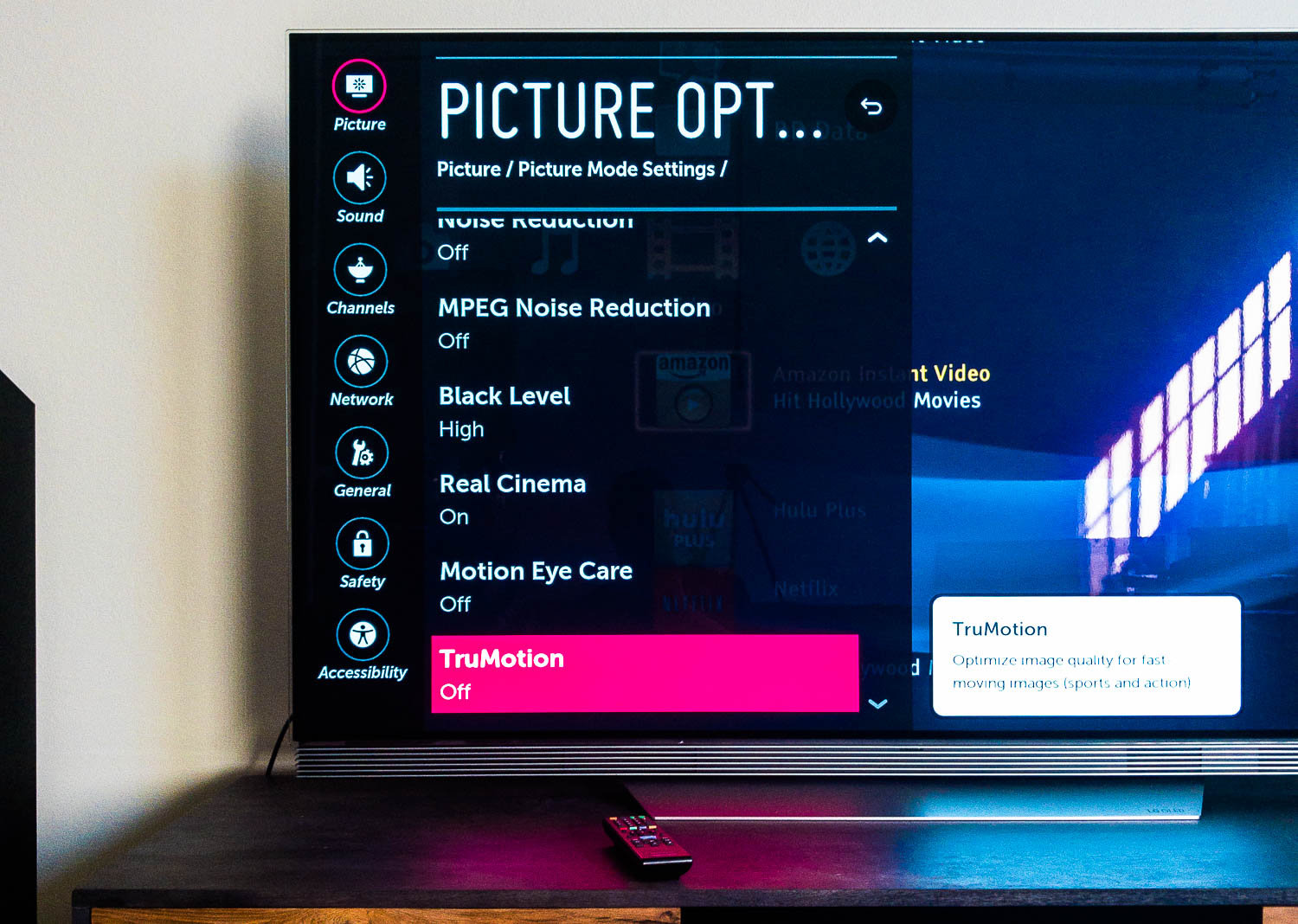
With Samsung's plasma line now discontinued (I bought one of the last ones!), my new recommendation is the LG OLED line, which I bought for my studio. On an LG TV, there are seemingly endless "features" to turn off, but the most important one to kill with fire is called "TruMotion". Leave "Real Cinema" on for the best 24p presentation.

170831-APC_5992-.jpg
Tags: Home Theater
35 Comments

Sony NEX FS100

March 23, 2011

I think Sony may have just made the ultimate DV Rebel camcorder. Check out this video from Hangman Studios and F-Stop Academy:

Price for the body is rumored to be in the $4,500 range.

Update

on 2011-03-23 18:12 by Stu

Big, grumpy review here.

Tags: Cameras, Sony FS100
16 Comments
Prev / Next
Featured
Maxon One
Maxon One

Cinema 4D, Forger, Red Giant, Redshift, Universe, and ZBrush, all in one bundle.

Slugline
Slugline

Screenwriting for Mac, iPad, and iPhone

Prolost Store
Prolost Store

Apps, presets, and other goodies for filmmaking and photography.


Featured Post

Featured
Log is the “Pro” in iPhone 15 Pro
October 10, 2023
Log is the “Pro” in iPhone 15 Pro
October 10, 2023
October 10, 2023

Recent Posts

Featured
Prolost Watches
May 7, 2026
Prolost Watches
May 7, 2026
May 7, 2026
Maxon Autograph
April 15, 2026
Maxon Autograph
April 15, 2026
April 15, 2026
My App Will Harm You Physically, Using Math
December 8, 2025
My App Will Harm You Physically, Using Math
December 8, 2025
December 8, 2025
Cameras, Phones, and Log — What’s the Juice?
February 3, 2025
Cameras, Phones, and Log — What’s the Juice?
February 3, 2025
February 3, 2025
Kino: My New Favorite iPhone Video App
May 29, 2024
Kino: My New Favorite iPhone Video App
May 29, 2024
May 29, 2024
Apple’s “Let Loose” iPad Event was Shot on iPhone — With Panavision Lenses
May 9, 2024
Apple’s “Let Loose” iPad Event was Shot on iPhone — With Panavision Lenses
May 9, 2024
May 9, 2024